Exception Management and Engine Enhancements
Workflow automation, a new Remedies screen, container deduplication, and Azure connectors — shipping together.
Security teams have two jobs: find what matters, and close it out. The finding side is largely solved. Closing things out is where backlogs grow, ownership gets murky, and teams run out of runway. This release is about the second job.
Across the workflow engine, the Remedies screen, container deduplication, and three new Azure integrations, the common thread is: fewer clicks from a confirmed risk to a closed ticket.
Workflow Engine: Multi-Action Automation
The Exception engine now does more than manage risk exceptions. The same IF/THEN logic drives ticket creation, email notifications, and alerts — and multiple actions can fire from a single rule.
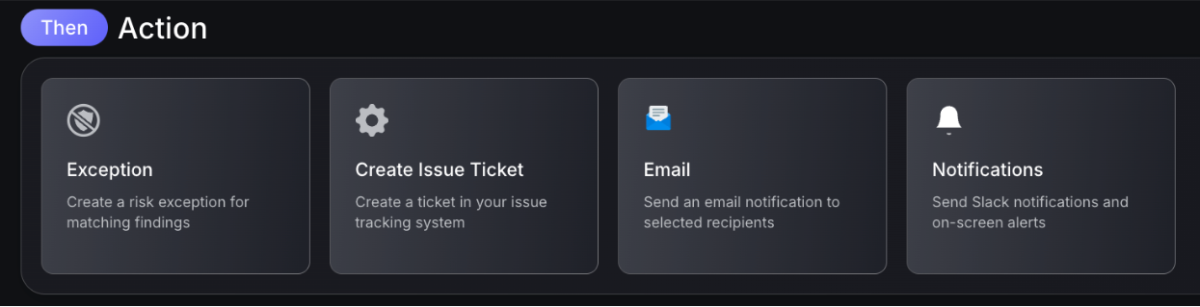
A risk acceptance can be triggered alongside an email to the owning team. A severity threshold breach can open a Jira ticket and notify the on-call engineer simultaneously. Rules can be combined; however it makes sense for the team running them.
The the same logic, for your entire workflow
What teams can automate
- Create tickets in Jira, ServiceNow, or other connected systems when findings meet defined conditions
- Send emails to asset owners, team leads, or security contacts on trigger
- Fire notifications and alerts across connected channels
- Chain multiple actions from a single workflow rule
The same engine that previously handled risk acceptance now handles the full handoff to development — without building separate automation on top.
Remedies Screen: A Cleaner Fix Path

Security teams rarely struggle to find vulnerabilities. The challenge is deciding what to fix first and making sure the fix actually closes the issue across the environment. The updated Remedies screen is built around that workflow.
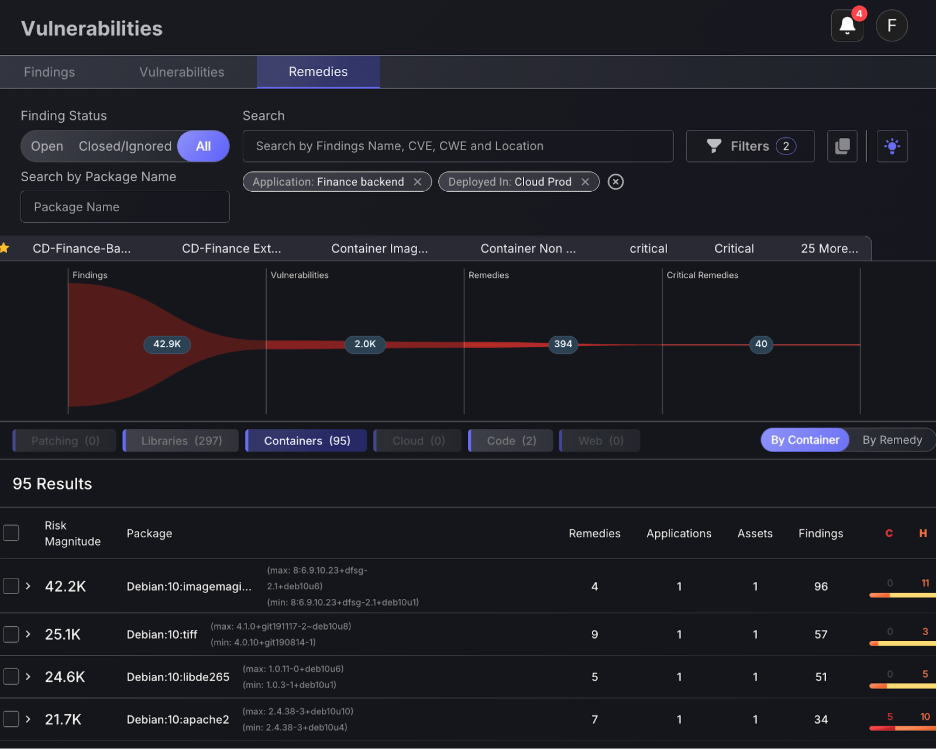
Instead of presenting long lists of individual vulnerabilities, Phoenix organizes remediation around the change that removes risk. Findings, vulnerabilities, and assets are connected to the remedy that resolves them, so teams can immediately see what a fix will close before work begins. The goal is simple: fewer alerts to sift through, and a clearer path from risk to resolution.
Remedies are grouped into domain tabs that reflect how engineering teams actually work: Libraries, Containers, Cloud, Code, Patching, and Web. Each tab highlights the type of change required to resolve the issue, allowing teams to focus on the remediation work relevant to their role:
- Library remedies focus on dependency upgrades across repositories, helping teams identify when updating a single package version can remove vulnerabilities across many applications.
- Container remedies trace vulnerabilities back to the container image or base layer that introduced them, revealing when a base image update can resolve issues across multiple derived containers.
- Cloud remedies address common configuration issues in cloud environments, such as overly permissive access policies or insecure resource settings.
- Code remedies surface fixes for SAST findings directly in the application source, guiding developers to the specific change required to eliminate the vulnerability.
- Patching remedies cover infrastructure-level issues that require updating operating system packages or installed software.
- Finally, Web remedies focus on vulnerabilities discovered on externally exposed applications and APIs, helping teams prioritize fixes for issues affecting the public attack surface.
Transform passive insights into proactive remediation
By separating these domains, Phoenix ensures each team sees the remediation work relevant to them. A platform engineer investigating container vulnerabilities is not buried in application dependency issues. A developer reviewing SAST findings can focus directly on code-level fixes. The result is a remediation backlog organized around real engineering work, not scanner output.
The key message is this: remediation lists support workflows by grouping remedies around common sources such as repositories, packages, or images. This makes it easier to plan remediation work and communicate priorities to engineering teams. When teams ask where to start, the remedies view highlights the changes that clear the most findings.
Library Remediation
Dependency vulnerabilities often appear across multiple services, repositories, and deployments. Without context, teams end up addressing the same issue repeatedly in different places.
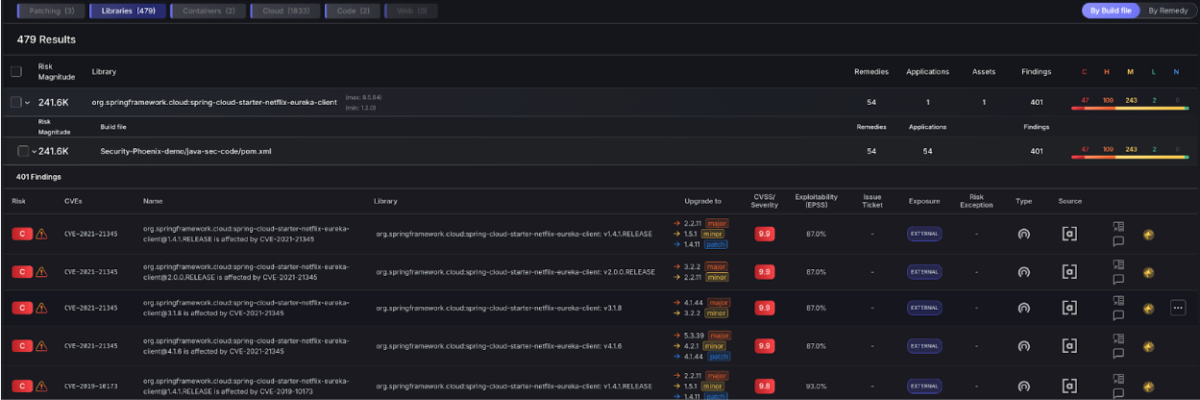
The Libraries tab changes how this work is surfaced. Phoenix groups findings by the dependency and version responsible for the issue, then shows how many applications and assets are affected. This makes it easy to identify the upgrades that will remove the largest number of findings across the environment.
A single dependency update might resolve vulnerabilities across dozens of repositories. Rather than triaging each finding individually, teams can focus on the upgrade itself. Phoenix highlights the dependency version to upgrade to, the repositories using the vulnerable version, and the findings that will close once the update is applied.
This approach also helps bridge the gap between security and development teams. Security teams can prioritize the upgrade that has the greatest impact, while developers receive a clear and actionable change to implement. The remediation conversation shifts from “which vulnerability should we fix?” to “which dependency upgrade clears the most risk.”
For organizations running Application Security posture management (ASPM) programs, this is a practical way to reduce vulnerability debt without overwhelming engineering teams.
Container Remediation
Phoenix’s Remediation Engine brings a fix-first approach to container security. Instead of flooding teams with vulnerability alerts, Phoenix traces issues from running containers back to their source—whether that’s a base image, dependency, or build file—and identifies the change that will actually resolve them.
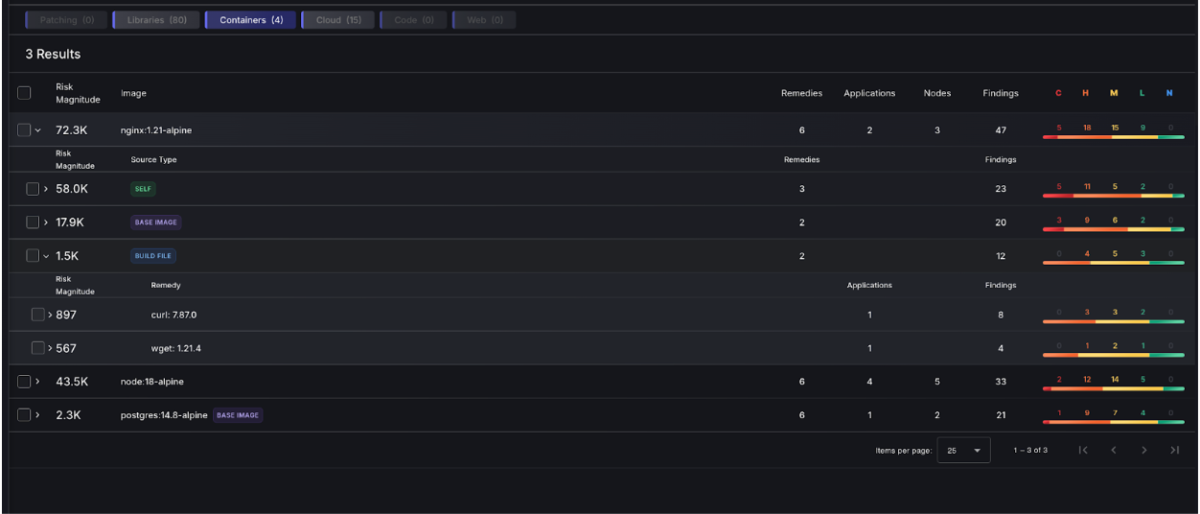
By mapping containers to their underlying images, repositories, and dependencies, the platform helps deduplicate repeated vulnerabilities and reveal the real fix path. A single upgrade or image update can often remove hundreds of related findings across environments.
Cut through the noise and with enhanced visibility
The result is a clearer remediation path. Security and engineering teams can focus on the changes that reduce the most risk, turning container vulnerability data into actionable remediation within their Application Security and ASPM programs.
With the base image visible in the container lineage graph, teams can trace repeated vulnerabilities to the shared image source and resolve them at the root. This complementary functionality will be explored in more detail below.
Remediation Campaigns
Remediation campaigns extend this methodology further by turning prioritized remedies into coordinated work. Campaigns allow security teams to group fixes, assign ownership, and track progress across teams. A dependency upgrade affecting several services, or a base image refresh across container environments, can be managed as a single effort with clear visibility into completion.
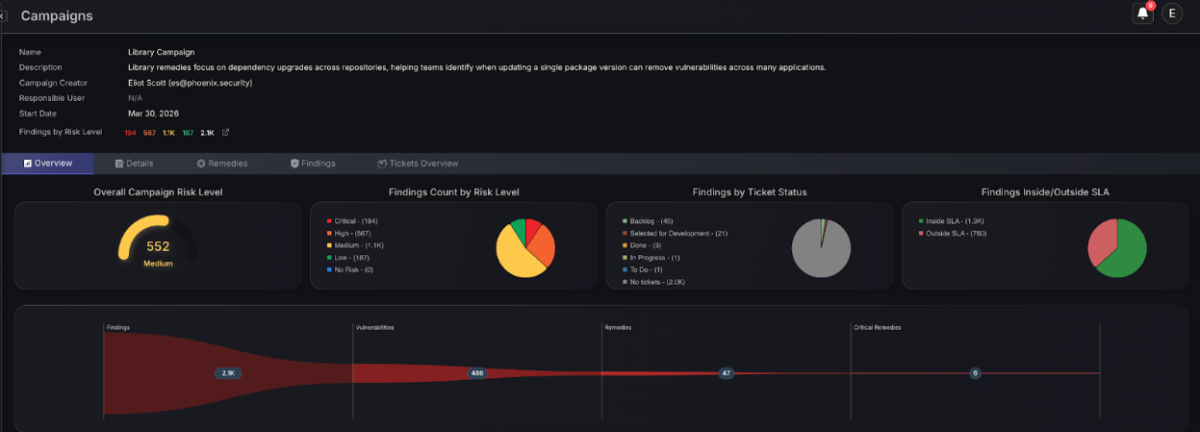
For organizations using Phoenix for Application Security posture management and attack surface management, the Remedies screen helps translate security data into action. Teams can see the fixes that matter most, coordinate remediation across repositories and environments, and drive meaningful reductions in exposure.
Remediation Domains
Remediation items are split by domain: Patching, Libraries, Containers, Cloud, Code, and Web. An AppSec engineer isn’t scrolling through cloud findings. A platform team isn’t buried in library CVEs. Each team sees the work that’s theirs.
Container findings in the Remedies screen use the same package-and-version model as the rest of the platform. That keeps deduplication consistent. A finding reported in three places appears once.
Details and Side Panel
Each remediation plan now has a side panel with the full context: affected assets, linked findings, fix path, and team ownership. No context switching to another screen to confirm what the fix covers.
Container Deduplication and Throttling
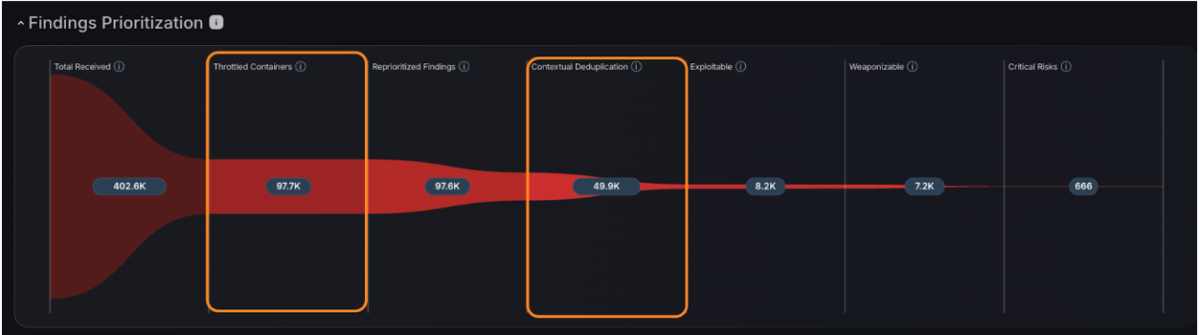
Two problems come up repeatedly in container security. Teams are drowning in findings from images that aren’t running. And a single vulnerable base image is generating duplicate alerts across dozens of derived containers.
Throttling Inactive Containers
Container throttling reduces findings from inactive containers and images that are no longer deployed. What surfaces is tied to what’s running — not everything that exists in a registry or has ever been scanned.
For teams managing large container estates, this changes the shape of the backlog significantly. Findings that can’t be acted on because the image isn’t running don’t belong at the top of the queue.
Base Image Detection
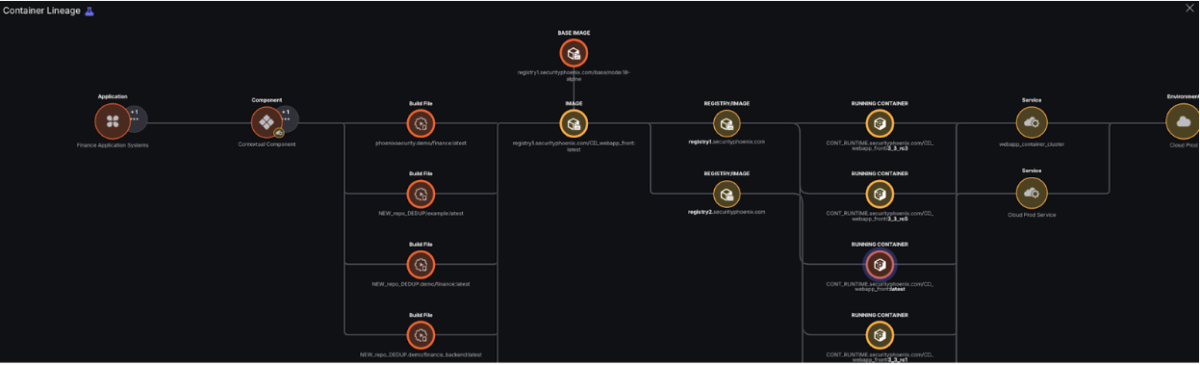
The Container Lineage graph now includes a base image node. When a vulnerability is present in a base image, the graph shows that all containers built from that image carry the same finding.
40 container findings from one base image vulnerability = one task.
That’s the operational difference: a remediation backlog that looks like 40 items is, in practice, a single patch to the base image. Teams can see that before they start triaging.
Contextual Container Deduplication
Contextual deduplication now runs across the full container estate. The same vulnerability found by multiple scanners, across multiple registry versions, appears as one finding with one owner and one fix path. Not five.
Phoenix maps deduplication against team rules — 32,000 team rules in the case of Bazaarvoice — so attribution stays accurate when the consolidated finding routes to the right team.
New Integrations
Azure Container Registry (ACR)
ACR integration pulls vulnerability scan results directly from your private registries. This provides critical visibility into “at-rest” risk, allowing security teams to identify and intercept compromised container images before they ever reach a production environment. By catching issues at the registry layer, you shift security further left in your deployment pipeline.
Azure Container Apps (ACA)
Our new ACA integration extends Phoenix’s visibility into serverless container workloads. Because serverless environments often abstract away the underlying infrastructure, traditional scanning approaches can leave blind spots. This connector closes that gap, ensuring that even your most highly-scaled, abstracted Azure workloads are monitored for vulnerabilities.
Azure Kubernetes Service (AKS)
The AKS integration correlates live runtime data with vulnerability findings across your Kubernetes clusters. This follows the Phoenix “Reachability” model: it identifies which vulnerable images are actively running in production versus those that are dormant. This context allows teams to ignore the noise and focus on the 10% of findings that pose an immediate threat.
Rapid7 InsightVM & Nexpose
Phoenix now supports Rapid7 as a primary integration source. By ingesting data from InsightVM or Nexpose, Phoenix can normalize infrastructure vulnerabilities alongside your application security data. This allows for a unified risk score that accounts for both the host-level weaknesses and the applications running on top of them.
JFrog Xray
We have added JFrog Xray as a dedicated scanner integration to bolster your Software Composition Analysis (SCA) strategy. Phoenix ingests Xray’s deep recursive scanning results, mapping identified vulnerabilities and license compliance issues directly to your software artifacts. This ensures your binary repository stays secure and compliant without manual cross-referencing.
ServiceNow CMDB
The ServiceNow integration has been significantly enhanced to streamline asset management. You can now create Phoenix assets directly from ServiceNow records, utilizing improved field mapping for high-fidelity data sync. This ensures that your security posture is always aligned with your “source of truth” for IT inventory and business ownership.
Microsoft Teams
Integration with Microsoft Teams brings security alerts into your daily workflow. Users can now receive real-time notifications, risk updates, and remediation tasks within their existing communication channels. By meeting developers and stakeholders where they work, Phoenix reduces the “time-to-remediate” and keeps teams aligned on high-priority fixes.
Other Updates
Improved filtering and navigation
Filtering and navigation across vulnerability data has been refined. Teams can now use a multi-select Finding Types filter to view vulnerabilities across several categories at once. The filter bar also keeps selected options visible even when many filters are applied. The Products autocomplete lookup now runs externally, improving reliability and preventing timeout errors on large datasets.
Custom statuses and permissions updates
Teams can now create and assign custom statuses directly from list and detail views, giving organizations more flexibility to match remediation workflows to their internal processes.
How Phoenix Security Fixes What Actually Matters
Your team doesn’t have a finding problem. They have a fixing problem.
Most platforms hand you a list. Phoenix hands you a plan — ranked by real risk, mapped to the team that owns it, with a clear path to close it.
What remediation looks like with Phoenix:
- One backlog, not five. Findings from SAST, SCA, containers, and cloud — deduplicated, correlated, and surfaced in a single prioritized queue. No more reconciling lists across tools.
- Ownership that sticks. Team attribution and inheritance mean the right ticket goes to the right engineer, first time. No routing, no guessing, no back-and-forth.
- Campaigns that move the needle. Group related findings into targeted remediation campaigns. Track progress, measure closure rates, and report real reduction — not raw counts.
- AI that does the legwork, not the deciding. Phoenix’s Remediator agent drafts fixes, creates tickets, and opens PRs. Your team reviews, approves, and merges. Every fix is traceable.
Phoenix Security changes the game.

The pattern is the same every time: teams that move from find and report to analyze and fix close more risk with less effort.
The results are clear:
- Bazaarvoice saved $6.3M in developer time and for teams removed critical in the first weeks of adoption
- ClearBank cut critical container vulnerabilities by 96–99% and reclaimed 4 hours per engineer per week.
- IAS saved an equivalent of 1.5M in development hours and reduced SCA-to-container noise by 82.4%
- Optimizely has been able to act on vulnerabilities sitting on the backlog.
Or learn how Phoenix Security slashed millions in wasted dev time for fintech, retail, and adtech leaders.