

Executive summary
AI agents now write a large share of your code, so your DevSecOps checks have to run inside the agent’s own session, and Purple Hooks does exactly that in Claude Code, Cursor and Codex.
Key takeaways
- Writing “don’t use
eval” in a prompt is advice, and the agent can ignore it. A real control is a check that can stop the agent’s command. - Check the code at push and at pull request, and send the results straight back to the agent so it can fix the problem before a human sees it.
- Block a pull request only for new problems the agent just introduced. Old problems that were already in the code are listed, but they do not stop anyone’s work.
- Let the security team set one set of rules for the whole company. Each team can add stricter rules, but nobody can relax them on their own.
- Make sure you can see which repositories have the check installed and running. If you cannot see it, you cannot count on it.

The problem: the agent writes the code, and your rules are only suggestions
In most engineering teams I talk to, developers no longer type most of the code. They ask an agent like Claude Code, Cursor or Codex to write it, then they review and merge. The agent works far faster than any review process was designed for.
Companies usually try to keep that code secure in two ways.
They give the agent better instructions. Teams write rule files and long prompts: “never use eval“, “always use parameterized queries”, “never put secrets in the code”. Good rules help, and Phoenix generates them from real findings. But a rule only nudges the agent. If the agent decides a shortcut is fine, it takes the shortcut.
They also rely on the CI pipeline, which checks the pull request later. By then the agent has moved on, and a person has to fix code they did not write, often days later.
Security teams have plenty of scan data. What they are missing is a check that runs at the moment the agent writes the code, following rules that the security team owns.
Why DevSecOps guidance alone fails when agents write the code
Four things go wrong in practice.
Instructions have no teeth. A rule file is just more text for the model to read. The agent decides whether to follow it, and you cannot prove afterwards that it did.
The agent’s own safety settings belong to the developer. In a live customer session in October, Claude Code’s built-in auto mode refused to commit an eval call before our check even ran. That was the right call, but it is a personal setting each developer can switch off, and a company policy cannot rely on it.
A report cannot stop anything. Our first version, in June 2026, ran an analysis when the agent’s session ended, but Claude Code does not let an end-of-session hook stop anything. So we moved the check to the moment the agent runs a command.
Too many alerts kill adoption. A check that blocks on every old problem in the repository blocks on day one, and developers remove it the same day.
The Phoenix approach: Purple Hooks
Purple Hooks puts a security check inside the AI coding agent itself. It is the center of three layers that work together, each one catching what the previous one missed:
- Guardrails guide what the agent writes, using rules built from your own findings.
- Purple Hooks stops the agent inside its session, while it can still fix the problem itself.
- The Phoenix check on every pull request confirms the result on our side, where nobody can switch it off.
Layer 1: Guardrails prevent the mistake before the agent writes it
Guardrails are security rules that Phoenix writes for your AI agents, based on the real vulnerabilities it has already found in your code. A cross-site scripting finding becomes a rule that tells the agent how to avoid that mistake in those files. If a repository has no serious findings yet, Phoenix runs a quick scan and creates best-practice rules for your stack instead.
You review the rules and download them in one click for Claude Code, Cursor, Gemini CLI or Codex CLI, and the agent reads them every time it writes code. Guardrails make the agent less likely to repeat a known mistake. The next layer catches anything that still gets through.

Layer 2: Purple Hooks stops the agent in its own session
Purple Hooks plugs into Claude Code, Cursor and Codex as a native “hook”, a small script the agent runs automatically before and after certain commands. It watches the three commands that move code toward production: git commit, git push and gh pr create. The decisions happen in Phoenix, using your security team’s rules, and neither the developer nor the agent can change them.
When the agent commits, nothing is scanned. Commits stay instant, and the agent sees a short note saying the check runs at push.
When the agent pushes, Purple scans the new code in the background. The agent does not wait. As soon as the results are ready, they appear in the agent’s own session, in two lists: Blocking (must fix) and Fix these too (worth fixing). A push is never blocked.
When the agent tries to open a pull request, Purple can stop it. If the change adds problems at the severity levels you chose, the pull request is not created. This is not a message the agent can talk its way around: the command simply does not run. The agent gets the full list of problems, with file and line, and one clear instruction: fix the Blocking list, then try again. And it does.
Built so developers keep it switched on
A security check only works if people leave it on. These are the choices that make Purple Hooks easy to live with:
- It only blocks on new problems in the lines the agent changed. Older issues still appear in the Fix these too list, so nothing is hidden, but they never stop the pull request.
- Vulnerable open source libraries are reported but never block a pull request.
- It never fakes a pass. If part of the scan could not run, Purple says so, and in block mode the pull request stays closed until it can check properly.
- Your security team decides how long a pull request waits: up to 300 seconds (5 minutes) by default, after which it opens and the agent posts the result as a comment, or until the result is ready.
- Fixes are suggested, never forced. For each problem, Purple can add guidance or up to 10 AI-generated fixes, clearly labeled as suggestions to review. They never change the verdict.
- False positives have a clean way out. When the check blocks something that is actually safe, the message includes a ready-made command to request a waiver for that finding. A different person approves it, and it expires after a time limit you set, up to 365 days.
Layer 3: the pull request check nobody can remove
The hook runs on the developer’s computer, so a developer could remove it. We say so openly, and it is why the third layer exists. Every pull request is also checked by Phoenix on our side, where nobody can switch it off. The hook gets problems fixed early, so this check passes first time far more often and remains your official record.
Configure it: one set of rules for the whole company
The security team sets the company-wide minimum under Policies > Scanning > Hook policy, such as “block pull requests with critical or high issues”. Each team can make its own rules stricter, but never weaker. If someone tries to save a weaker setting, Purple refuses it and explains which setting is the problem. If a team really needs to go below the minimum, an admin can grant a policy exception for a limited time, and the check announces it every time it applies. Every change is recorded.

Roll it out: set up in one command
A developer downloads the setup pack from Phoenix and runs a single command. The pack contains a one-time code that expires after 15 minutes, which the installer swaps for a personal login stored safely on the developer’s machine. Nobody has to copy or paste API keys. For larger teams, Phoenix opens a draft setup pull request per repository on GitHub, GitLab or Azure DevOps, and your team merges it when ready.
See where it is running
A check that looks installed but does nothing is worse than no check. Purple records every time a scan is skipped. The Enforcement page shows, for each repository, whether the hook is installed and up to date, which repositories have gone quiet, and, on GitHub, how many pull requests were merged even though the Phoenix check was red in the last 90 days.
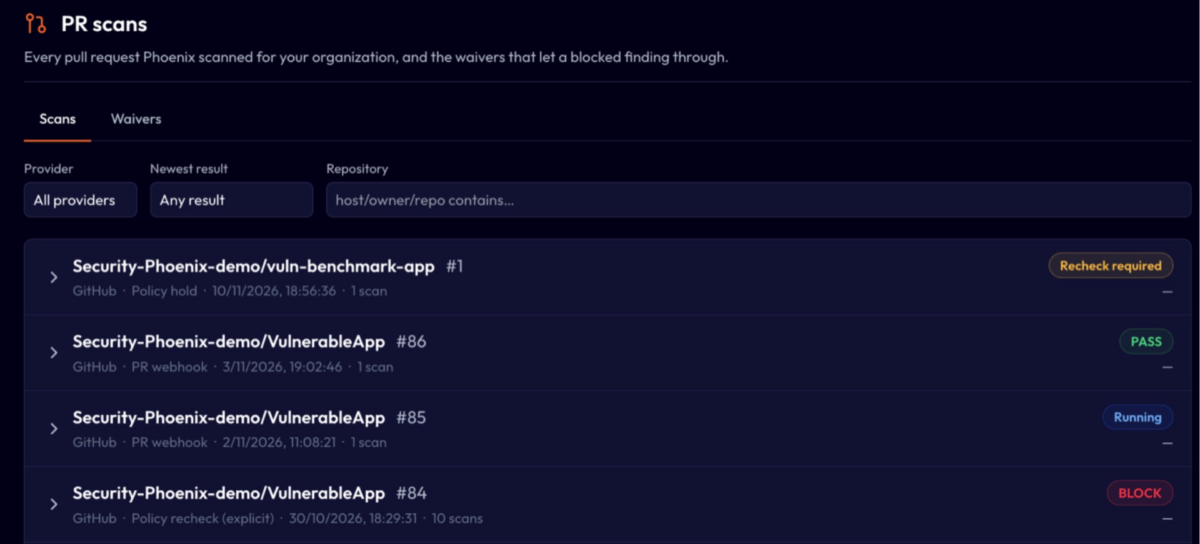
The PR scans page lists every pull request Phoenix scanned, with what started the scan and the newest result: Pass, Block, Running or Recheck required. Its Waivers tab shows every approved waiver next to the pull requests it affected.
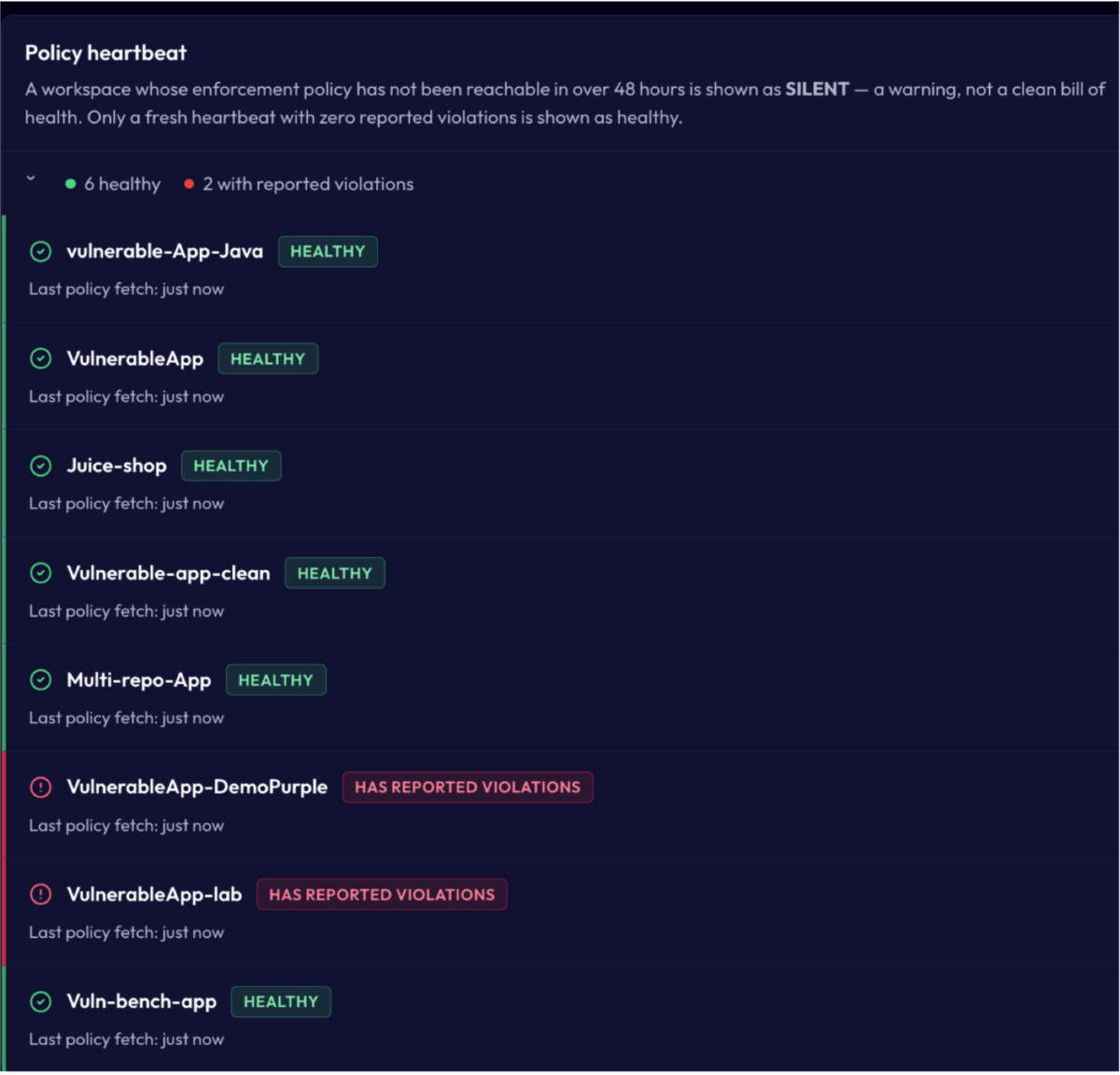
The Policy heartbeat shows, for each workspace, whether the gate is still talking to Phoenix. A workspace is Healthy only when its hook fetched the policy in the last 48 hours and reported no violations. After 48 hours of silence it is flagged as Silent, a warning rather than a pass, because silence can mean the hook was removed. Workspaces with blocks or skipped scans show Has reported violations, so you know where to look first.
Real-world example: the agent fixes its own code
We ran the whole flow in our test environment with Claude Code and a demo app.
The agent added a calculator endpoint that used eval, a classic code-injection risk. The agent committed and pushed with no friction. When it tried to open the pull request, Purple stopped it after 94 seconds and showed one blocking problem, with the exact file and line.
The agent’s reply was clear: it would not bypass the security check. It offered two options: fix the code itself, or ask Purple for a suggested fix first with /purple-scan remediate.
We typed “fix it”. The agent removed eval, wrote a safe replacement and tried again. This time the pull request passed, in 91 seconds. No person touched the code.

Then the third layer, the Phoenix check on GitHub, confirmed the result.
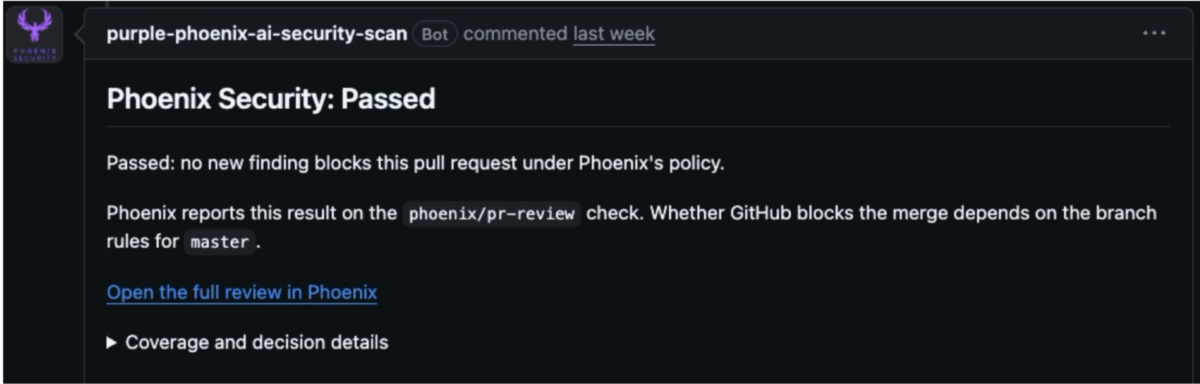
That is the whole idea in one loop. The vulnerable line never reached a human reviewer. The agent that wrote it also fixed it, while it still had all the context.
Protect yourself with Phoenix Purple – find TRUE critical chainable vulnerabilities with exploits
Practical guidance: how to start on Monday
Start by watching, not blocking. Install Purple Hooks on 3 to 5 active repositories and set pull requests to warn only. After a week, the Enforcement page shows which teams use agents, how often new problems appear and which repositories are not covered.
Then switch on blocking. A good starting point is: block critical and high problems on pull requests, warn on pushes, and leave commits alone.
Turn on waivers before you start blocking. Developers need a fair way to handle false positives, or they will look for ways around the check.
Watch the “merged past a red check” number. If it is above zero, your branch protection rules need tightening.
Next steps
- Look at the rule files you already give your agents. Every rule you would like to enforce, not just suggest, is a candidate for Purple Hooks.
- Set your company-wide policy under Policies > Scanning > Hook policy, then roll it out to one team with the setup pull request.
- See it working on your own code. Book a demo at securityphoenix.io/demo and we will show you an agent being stopped, and fixing its own mistake, live.
Purple Hooks is available now on the Phoenix Enterprise plan, for Claude Code, Cursor and Codex.


