
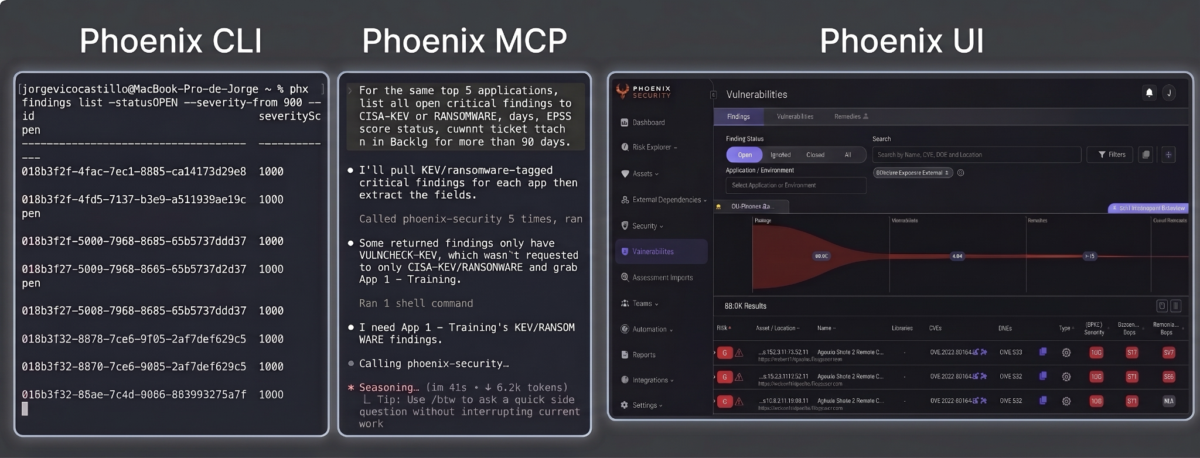
Executive Summary: Phoenix Security now ships two open-source clients — a full v1.27 REST API CLI and a Model Context Protocol server — giving security teams the same platform in three complementary surfaces: the UI for exploration, the terminal for automation, and any MCP-capable AI agent for conversational triage.
Key Takeaways
- Install the CLI (
phx) with a singlepipxcommand and pipe Phoenix findings directly into CI gates. Exit codes make build blocking a one-line policy. - Add the Orange MCP server to Claude Code, Cursor, Windsurf, or ChatGPT and query risk posture in natural language. 15 read tools, 19 write tools, read-only default.
- Reproduce any agent action as a script. Both clients share the same Python library, so every write flows through the same import pipeline that scanner ingest uses.
- Check
phx gapsandphoenix_api_gapsbefore assuming an API limit. Phoenix surfaces what v1.27 cannot do today, with documented workarounds and roadmap flags visible to both humans and LLMs. - Skip the prompt engineering. Prebuilt skills for Claude, Cursor, ChatGPT, and OpenAI Codex ship in the MCP repo — find-asset, find-vulnerability, find-remediation, exploitable-vulnerabilities, application reports, team risk, enrichment.
1. Security Data Lives in One Place When It Needs to Live in Three
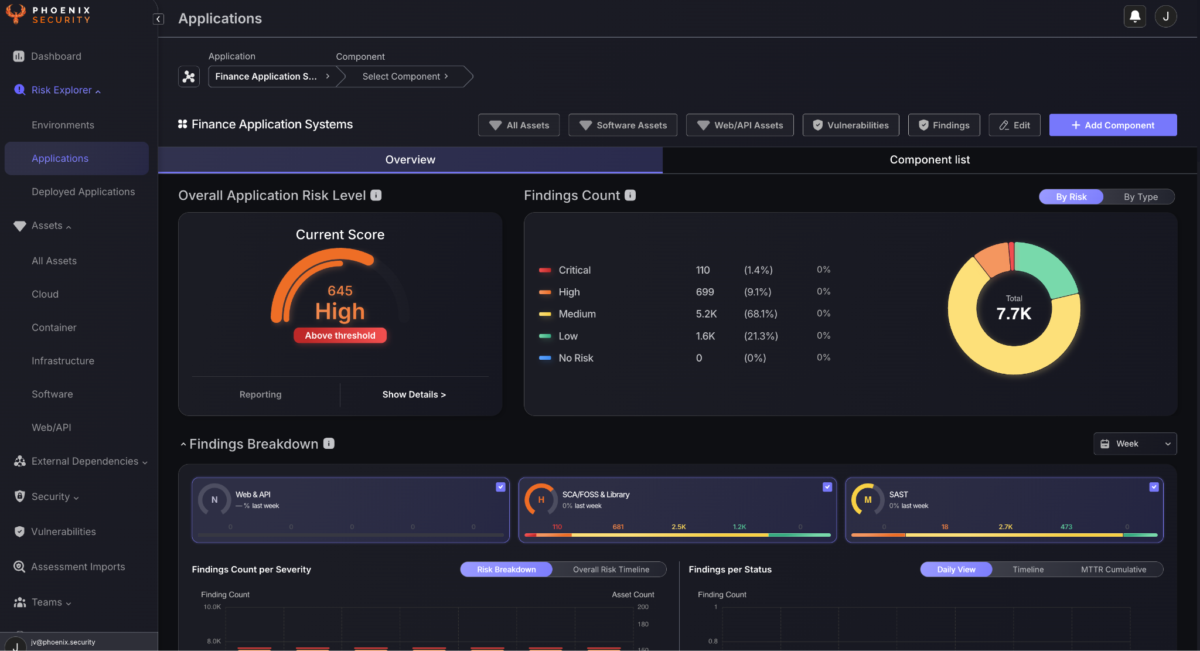
A CISO builds an exposure narrative in a dashboard. Reachability graphs, risk aggregation, remediation campaigns, container lineage — visual, cross-team, executive-ready. That is the first surface, and it is where most ASPM UX investment goes.
A DevSecOps engineer writes a CI gate in a shell. They need severityScore >= 900 && reachability.external == true to fail a build, deterministically, with a clean exit code. That is the second surface.
A security analyst asks Claude which applications are breaching SLA by owning team, right now. They are in Slack, in Cursor, or in a shared Claude conversation with the AppSec lead. That is the third surface.
Phoenix consolidates findings from over 205 different scanners across code, containers, cloud, and cluster. All of that data has always been in the API. Some of it was reachable through the UI. Very little of it was easy to reach from the second and third surfaces without writing scanner-specific glue code, wrapping OAuth flows manually, and hoping the pagination behaved.
That is the gap we shipped clients for.
The industry pattern here is worth naming plainly. Most ASPM tools were architected UI-first. The API exists because enterprise procurement demands one. It is documented but not wrapped. Retries, Retry-After handling, cursor pagination, token refresh, error taxonomy — someone builds all of that internally before the automation is trustworthy. The MCP layer, meanwhile, does not exist at all. Which means that when your CISO opens Claude and asks a question about their own risk posture, the answer is a hallucinated screenshot or a “sorry, I don’t have that data.”
Same data. Three surfaces. Two of them still bespoke work.
2. What API-First Actually Requires
“We have an API” is table stakes. It does not get anyone to the second or third surface without meaningful engineering work.
For the terminal surface, the API needs to be wrapped as a first-class CLI. That means a token flow that handles OAuth client credentials without exposing the secret in ps output. Automatic retries on transient 429s and 5xxs, respecting Retry-After headers. Cursor-based pagination that composes with Unix pipes. Idempotent write semantics — asset creation via CLI needs to hit the same import pipeline that scanner ingest uses, or the data diverges. Exit codes that map cleanly to CI outcomes: 0 for success, 2 for config error, 3 for auth, 4 for API error, 5 for capability gap. And an honest surface for what the API cannot do yet, so scripts fail loudly instead of silently.
For the agent surface, the requirements are different. Model Context Protocol is Anthropic’s open standard for tool-calling between LLMs and external systems. Any MCP-compliant client — Claude Code, Claude Desktop, Cursor, Windsurf, OpenAI Codex, ChatGPT — can call an MCP server and use its tools during a conversation.
What matters is what the server exposes. A minimal wrapper of five tools with no gap awareness and no write semantics makes for a bad demo. LLMs invent endpoints when they cannot find the right one, and a hallucinated PATCH /v1/findings/{id} returns nonsense that erodes trust in a single conversation.
What matters is that the tool catalog covers the operational surface, the agent knows what it cannot do so it picks documented workarounds, writes go through the same official pipeline as everything else, and read-only mode is available for safe adoption.
Both requirements — full CLI wrapping and MCP-native tool exposure — have to be true simultaneously, and they have to be underpinned by the same client library. Otherwise agent actions and script actions diverge, and the security team loses the auditability that makes automation acceptable to change management.
3. The Phoenix Approach: Same Data, Wherever the Question Is Asked
Developer-Aligned Security is a Phoenix pillar: security tooling should meet engineers and security teams in the interface they already work in, not force them into a new one. The dashboard remains the natural surface for exploration and executive review. The CLI and MCP extend that principle into the terminal and the agent — same data, same risk math, exposed where the question is being asked.
Two new repositories, both public and MIT-licensed:
- Phoenix-Security-CLI — a Python CLI, distributed via
pipx, that wraps every endpoint of the Phoenix REST API Enterprise v1.27. - Phoenix-Security-Orange-MCP — a Model Context Protocol server for Claude, Cursor, Windsurf, ChatGPT, and any MCP-capable agent.
The design principle that binds them: one client library under both. The retries, the Retry-After handling, the pagination, the token flow, the Phoenix payload quirks — implemented once, shared between the two. This is where things break down for platforms that ship a CLI and an MCP as separate projects. Agent actions and script actions diverge over time, and reproducibility dies.
Under Phoenix’s approach, the CLI is deterministic. Given the same input, you get the same output, safe to run in a Jenkins step. The MCP server is conversational. An agent decides which tools to call based on a prompt, and results shape the next question. But every tool call an agent makes has a one-to-one CLI equivalent. Anything Claude does through phoenix_search_findings can be replayed as phx findings list with the same filter set. Every agent action is a shell command in disguise, and every shell command is scriptable.
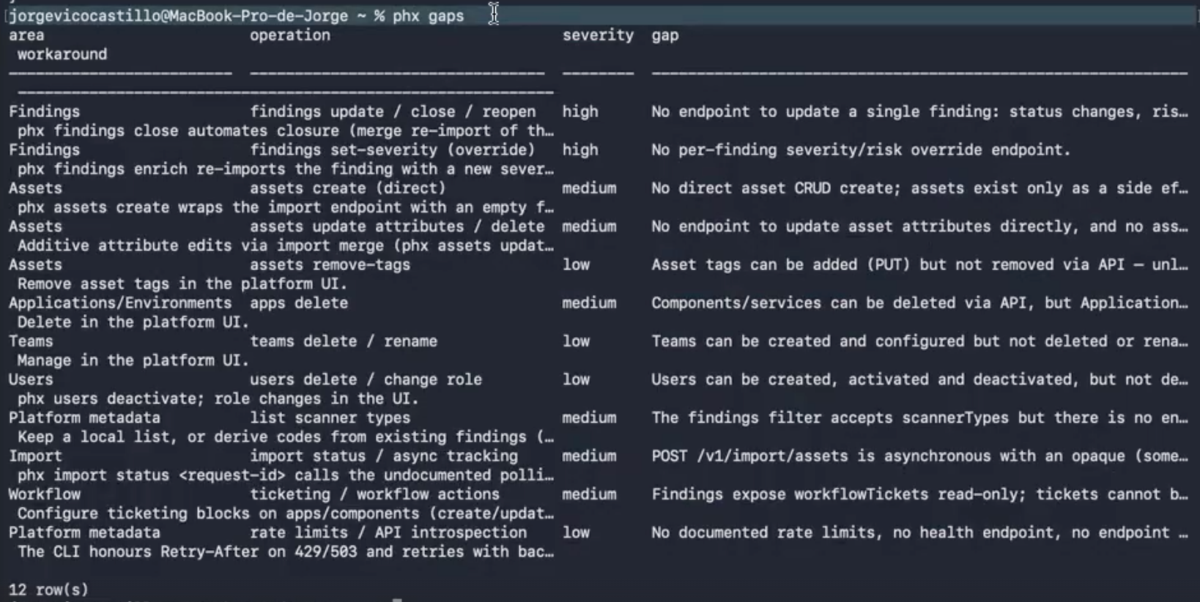
For the CLI, the coverage is deliberately broad: assets (search, tag, create, update, enrich), findings (list, get, add, close, enrich), the full import pipeline (bulk with new, merge, delta modes), applications, components, teams, users, and a raw escape hatch — phx api METHOD /v1/... — for anything that is not wrapped explicitly. Exit code 5 flags a capability gap; running phx gaps prints the current gap table with documented workarounds. Running phx gaps --required prints the wishlist with proposed schemas.
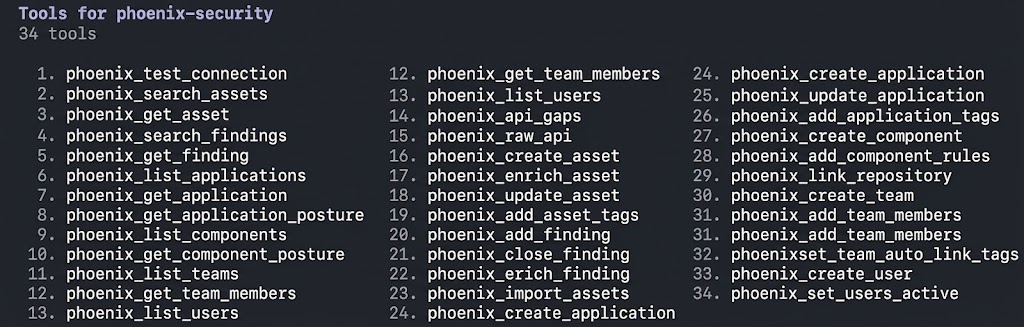
For the MCP server, the tool inventory splits cleanly. 15 read tools for search and inspection. 19 write tools for lifecycle operations. And one meta-tool, phoenix_api_gaps, that the agent uses to check its own limits before attempting operations. PHOENIX_MCP_READ_ONLY=true disables all writes with one environment variable, which is the recommended posture for early rollout.
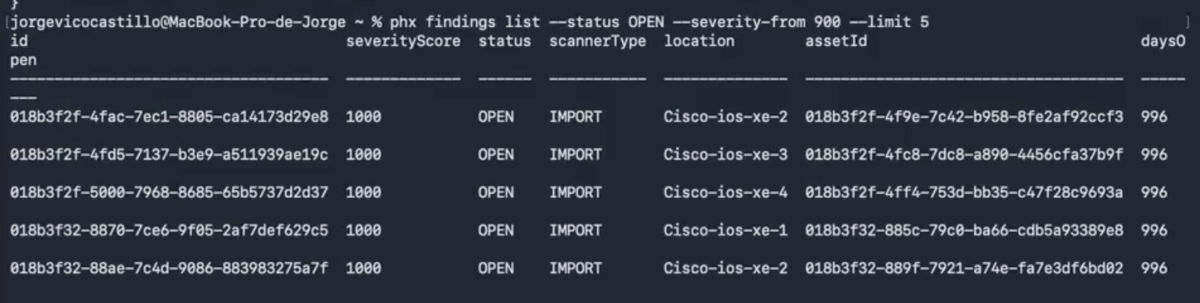
The Risk Formula stays the same across all three surfaces: Exploitability + Exposure + Reachability + Business Context. Not raw CVSS. The tridimensional risk score the UI shows is exactly what phx findings list --severity-from 900 filters on, and exactly what Claude sees when asked about critical risk.
4. What a Real Rollout Looks Like
Take a Phoenix customer with a 47-application portfolio and roughly 231 components mapped across their platform. Before the CLI, onboarding that structure meant manual UI work — creating applications, defining components, mapping repositories, assigning teams — over several sessions. With the CLI, engineering owns a phoenix-taxonomy.yaml file in their platform repository, and a CI job applies it via phx on every change. That is the PYRUS model of CMDB-as-code: application structure defined by the team that owns it, versioned in Git, applied automatically.
Once the taxonomy is live and scanner ingest is flowing, the operational loop starts. An AppSec engineer opens Claude Code in the morning and asks:
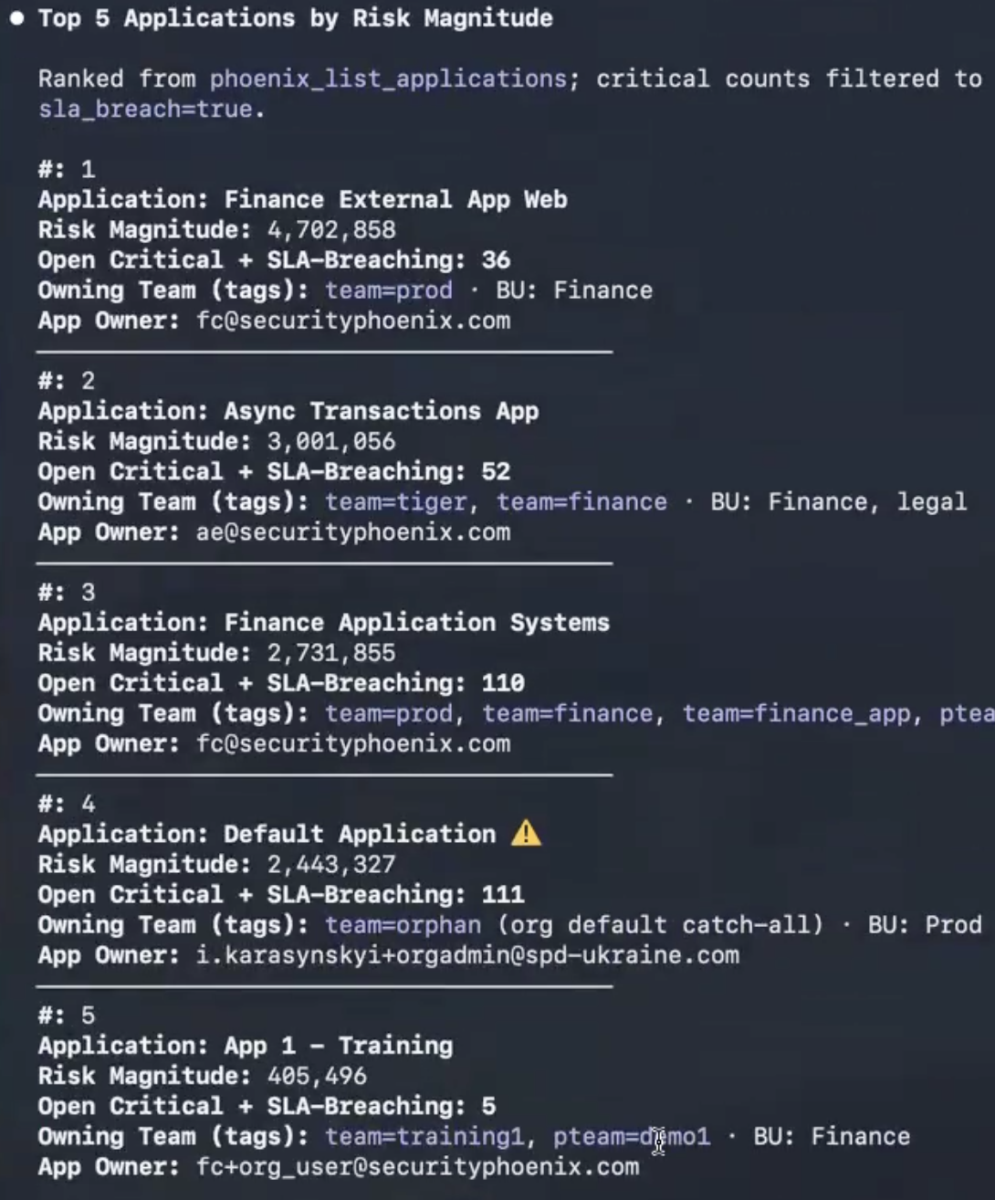
Show me the top 5 applications by Risk Magnitude. For each one, list the number of open critical findings currently breaching SLA, and identify the owning team.
Claude calls three MCP tools — list applications sorted by risk magnitude, search findings filtered by severity and SLA breach, resolve team ownership — and returns a structured answer in seconds.

The engineer follows up:
Of those, which have findings with EPSS above 0.7 that are also running in a production container right now?
Container reachability plus threat intel weaponization. Two more tool calls. A short list of findings that are live-instantiated in production and actively being exploited in the wild.

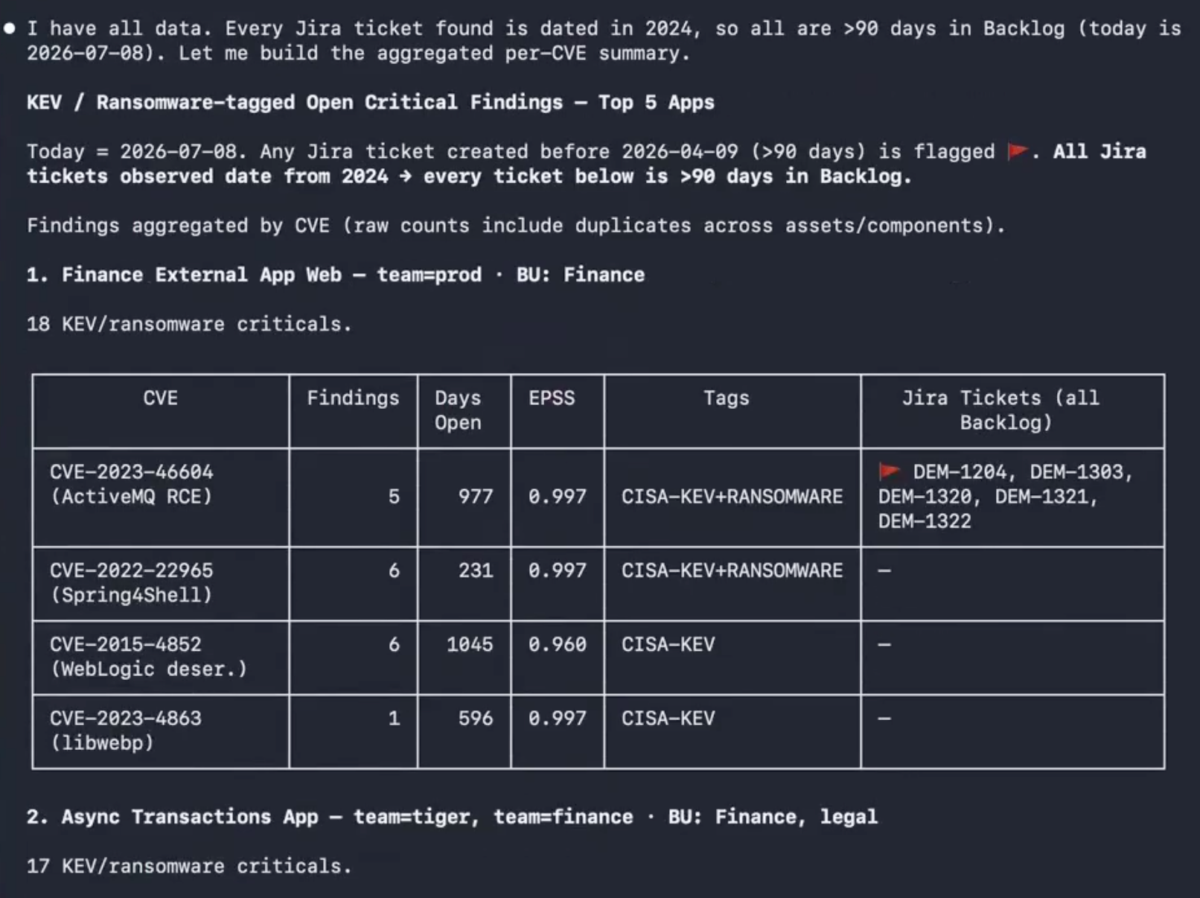
That is the triage moment. From there, the engineer asks Claude to group the findings by remediation campaign. Real Phoenix customer data shows one such campaign resolved 273 findings across the portfolio through 35 library upgrades across 7 shared dependencies. The remediation math is what makes this actionable: 35 upgrades, not 273 individual fixes. The MCP server surfaces that grouping via phoenix_search_findings composed with phoenix_get_application_posture, so the engineer does not need to reconstruct the campaign logic themselves.
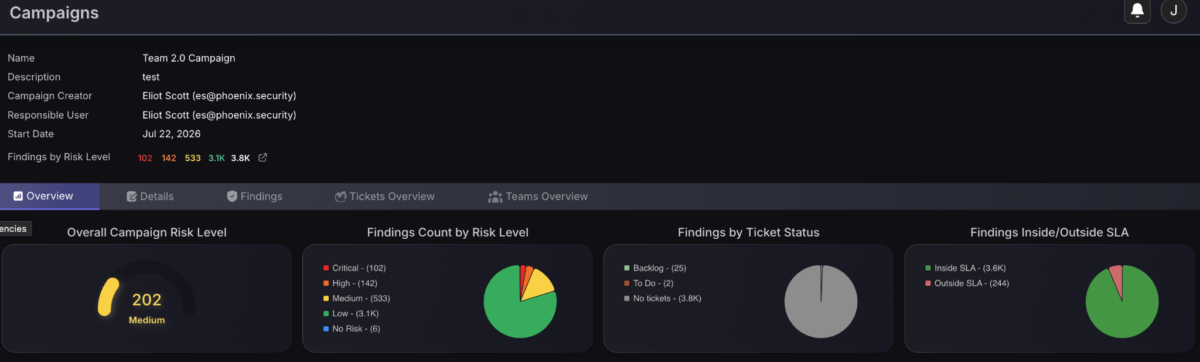
Meanwhile, the same underlying platform continues to serve the CISO’s Monday morning executive review through the UI: reachability graphs for the largest attack surface reductions, risk trend lines by business unit, and the Container Version Throttling view showing which vulnerable images are actually running versus which are just sitting in a registry — the 467,000 to 8,000 container reduction pattern Phoenix customers see when this filter is applied.
One taxonomy. One risk model. Three surfaces where the same story gets told to the right audience in the interface they already work in.
5. Monday Morning Checklist
Concrete steps for a team that wants to bring these two clients into their workflow this week:
Generate API credentials in the Phoenix UI under Organisation → API Access. Save the client secret into your secret manager immediately — it is shown once at creation.

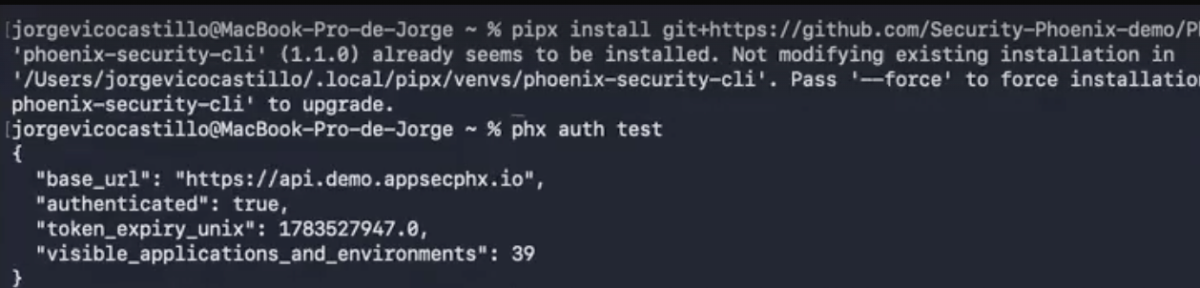
Install the CLI: pipx install git+https://github.com/Security-Phoenix-demo/Phoenix-Security-CLI, then run phx auth test against your demo tenant to verify.
Pull a real query: phx findings list --status OPEN --severity-from 900 -o table --limit 5. This is the exact shape of query that seeds a CI gate.
Add the MCP server to Claude Code in read-only mode with one claude mcp add command and PHOENIX_MCP_READ_ONLY=true. Ask Claude to summarise your top-ten applications by Risk Magnitude and their SLA breach status.
Run phx gaps --required and share the output with your Phoenix account team. The API capabilities that hurt your workflow feed into the v1.28 API roadmap directly.
Next Steps
For engineering leaders: pick one CI pipeline this quarter and wire in a phx posture check. Start in warning-only mode; graduate to a build-blocking gate after two weeks of data.
For AppSec teams: install the MCP server on the workstations of your two most senior engineers first. Let them find the natural triage prompts before rolling out to the wider team.
For CISOs: schedule 30 minutes with your Phoenix account team to walk through the API gap list and align on which endpoints the v1.28 API needs to close for your workflow to be fully agentic.


